API-Driven Interoperability
OpenHub utilizes secure APIs to establish a live connection between Microsoft Teams and Google Workspace, enabling uninterrupted, real-time collaboration.





Chat, call, and meet across Teams and Google Workspace, securely and seamlessly.

Search Google or Teams user by name or email address

Instantly connect with colleagues on any platform for private, effective communication

Bring teams together across different platforms (multi-platform group chats) without switching environments

Synchronize conversations, making it easy to stay on top of group discussions

Effortlessly share and access files over different platforms, boosting your team's productivity and efficiency

Instantly elevate your chats to voice and video calls

Communicate with your customers, partners, and suppliers on different platforms

Maintains points of presence in key global regions, the US, EU, and Asia-Pacific, to meet data sovereignty regulations

Administrators can configure OpenHub directly within Google & Microsoft admin consoles
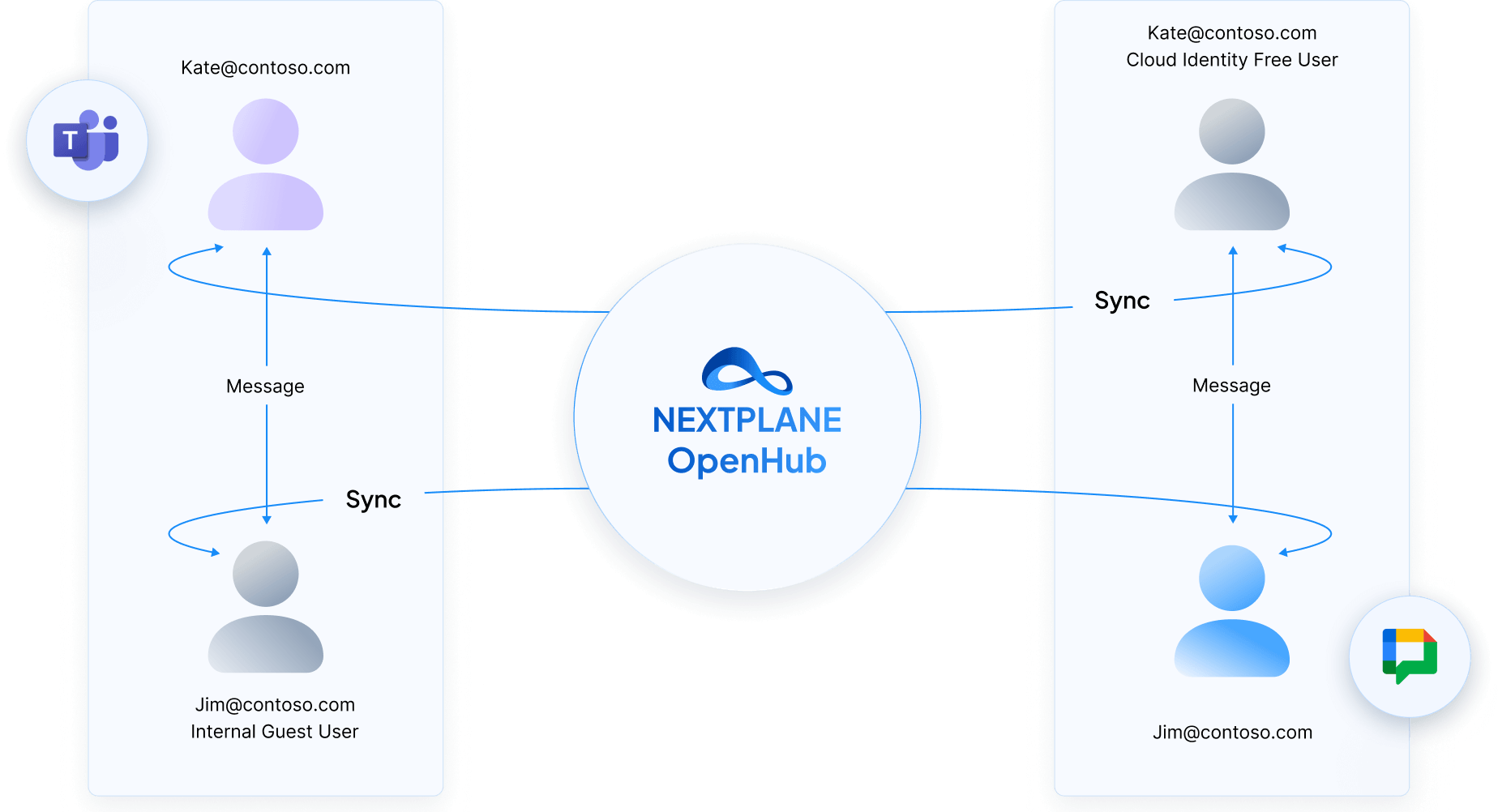
OpenHub seamlessly connects Microsoft Teams and Google Chat through secure, real-time message sync using proxy guest accounts.
OpenHub utilizes secure APIs to establish a live connection between Microsoft Teams and Google Workspace, enabling uninterrupted, real-time collaboration.
Each user is mirrored across platforms:
Messages sent in Teams or Google Chat are instantly reflected through proxy user accounts—ensuring native, synchronized conversations across platforms, with no toggling or message loss.
Deployment takes just hours, and OpenHub is managed via Teams and Google Admin consoles without a need for a NextPlane management portal.
OpenHub delivers a native Teams and Google Workspace experience for chat, file sharing, and supported voice/video scenarios—directly inside each platform's client.

Native Teams and Google Workspace experience for chat, group channels/spaces, file sharing, and supported voice/video—directly inside each platform's client.

Dedicated single-tenant deployment running in the customer's own GCP project, with full data control and enterprise-grade isolation.

All users and guests remain governed by the customer's existing Microsoft Teams and Google Workspace identity policies.

Only the required domain-wide delegations and scoped interoperability permissions—fully aligned with Microsoft and Google best practices.
No separate OpenHub admin console required. Configuration and management happen directly within existing admin environments.

Pay-for-what-you-use licensing based on active users—without guest licensing overhead or proxy-user management.

Deployment measured in weeks, not months, thanks to a simplified architecture without synthetic identities or proxy tenants.

Continuous expansion of interoperability capabilities, including enhanced Teams ↔ Google communication scenarios.









Enables real-time, secure communication between field and office teams while eliminating consumer-grade messaging risks.

Facilitates seamless cross-platform collaboration, preventing costly rip-and-replace strategies and ensuring operational stability.

Supports enterprises maintaining multiple collaboration platforms without forced migrations.

Synchronize conversations, making it easy to stay on top of group discussions







 April 24, 2026
 April 24, 2026
 April 6, 2026 April 6, 2026
 February 26, 2026 March 2, 2026
 February 12, 2026 February 12, 2026
Success!